Change Release Notes
This release is packed with performance boosts, smarter behavior, cleaner visuals, and a big step forward for education features. Under the hood, a lot has been reworked to make ARC faster, more stable, and more enjoyable to use across the board.
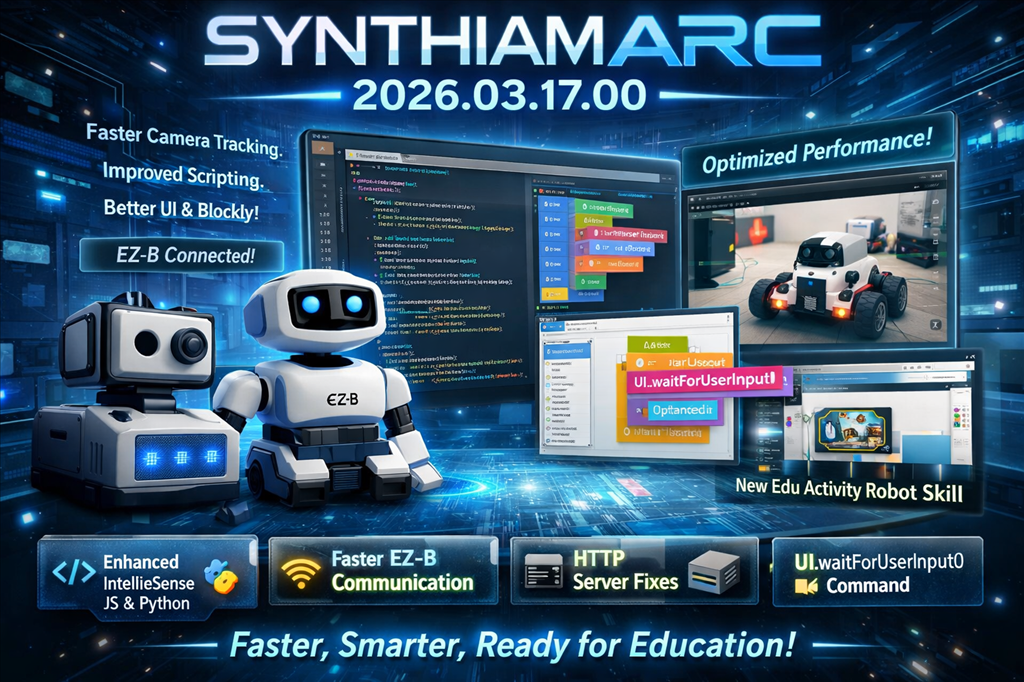
Core Improvements
EZ-B Communication Evolution
- Moved the EZ-B listener server out of the Connection robot skill and into a centralized ARC service
- This new shared service is now used by multiple robot skills, including the Camera device
- Improves scalability and reduces duplicated logic across skills
Faster, Safer Communication
- Improved Serial and Network EZ-B communication drivers
- Fixed a potential race condition
- Overall performance improvements for more reliable connections
HTTP Server Stability
- Fixed encoding issues in both
HttpServerandHttpServer Custom - Resolved a thread state bug that could cause instability
Performance & Rendering
Theme Renderer Upgrade
- Fixed a small GDI object memory leak
- Improved font clarity
- Better layer rendering for a cleaner UI experience
Video Pipeline Optimization
- Replaced legacy
memcpyusage with optimized memory copy buffers - Improved performance for video streaming and processing
Camera System Enhancements
Removed a potential race condition in the camera driver
Improved overall performance
New
UCCameraCanvas:- Maintains a local copy of bitmap memory
- Prevents UI from referencing freed memory
Added safety checks to ensure memory is valid before UI updates
Tracking Engine Boost
Significant optimizations across all camera tracking types:
- Object
- Color
- Custom Color
- Haar
- Custom YCbCr
- Face
- Glyph
- Motion
Expect faster and more responsive tracking across the board.
Scripting & Engine Improvements
Smarter Script Synchronization
- Optimized cancellation tokens in the scripting engine
- Blocking scripts now synchronize correctly with caller scripts
Waitcontrol commands now properly respect cancellation tokens
Cleaner API
- Removed
IsConnectedfrom Audio classes in JavaScript and Python - Use
EZB.IsConnected()instead
Speech Recognition Fixes
- Fixed an issue in Bing Speech Recognition where audio headers may not be fully written before transcription
- Resolved a rare threading issue under specific conditions
User Interface Improvements
Window Behavior Fix
Auto-position options window no longer restores window state when:
- Dragging the title bar
- Double-clicking the title bar
Prevents accidental resizing when using touchscreen servo controls
Numeric Selector Control
- Added option to enable/disable right-click manual entry
- Ideal for touchscreen devices to prevent accidental keyboard popups
IntelliSense Improvements
- JavaScript and Python editors now suppress IntelliSense popups when typing inside quotes
- Less intrusive and more context-aware suggestions
Blockly Enhancements
Visual Improvements
- Toolbox category colors now match their corresponding blocks
- Updated block colors for better distinction and readability
Organization
- Movement servo blocks moved into a dedicated Servo category
New Capability
Added
UI.waitForUserInput():- Available in JavaScript, Python, and Blockly
- Suspends script execution and prompts user for input
- Includes timeout support
- Found under the Text category in Blockly
Engine Updates
- Updated to Blockly v12.4.1
- Multiple fixes and stability improvements (ongoing testing continues)
Embedded Browser Enhancements
Now supports loading local files for:
- Sound effects
- Graphics used in Blockly
Camera & Audio Fixes
Removed UTF-8 and high ASCII characters from audio filenames in:
- SoundBoard PC
- SoundBoard EZ-B
Prevents compatibility issues across systems
Connection Experience
Connection robot skill now displays the EZ-B advertised name
Supports devices like:
- EZ-B v4
- ESP32
- IoTiny
Makes it easier to identify robots by friendly name instead of IP address
Education Features
Edu Activity Editor (First Release)
- Initial release of the Edu Activity Robot Skill
- Lays the foundation for creating structured educational content for ARC
Summary
This release focuses heavily on performance, stability, and usability:
- Faster camera and tracking systems
- More reliable communication and scripting
- Cleaner UI behavior and rendering
- Major groundwork for education features
Everything feels tighter, smoother, and more predictable-exactly what you want when building and controlling robots.
More updates are coming as the education system and Blockly enhancements continue to evolve.
ARC Downloads
ARC Free
Free
- Includes one free 3rd party plugin robot skill per project
- Trial cloud services
- Free with trial limitations
For schools, personal use & organizations. This edition is updated every 6-12 months.

ARC Pro
Only $8.99/mo
- 2 or more PCs simultaneously
- Includes unlimited skills
- Cloud backup
- And much more
Experience the latest features and bug fixes weekly. A Pro subscription is required to use this edition.
Runtime
Free
- Load and run any ARC project
- Operates in read-only mode
- Unlimited robot skills
- Early access fixes & features
Have you finished programming your robot? Use this to run existing ARC projects for free*.
- Minimum requirements are Windows 10 or higher with 2+gb ram and 500+MB free space.
- Recommended requirements are Windows 10 or higher with 8+gb ram and 1000+MB free space.
- Prices are in USD.
- ARC Free known-issues can be viewed by clicking here.
- Get more information about each ARC edition by clicking here.
- See what's new in the latest versions with Release notes.
Compare Editions
| Feature | ARC FREE |
ARC PRO |
|---|---|---|
| Get ARC for Free | View Plans | |
| Usage | Personal DIY Education |
Personal DIY Education Business |
| Early access to new features & fixes | Yes | |
| Simultaneous microcontroller connections* | 1 | 255 |
| Robot skills* | 20 | Unlimited |
| Skill Store plugins* | 1 | Unlimited |
| Cognitive services usage** | 10/day | 6,000/day |
| Auto-positions gait actions* | 40 | Unlimited |
| Speech recongition phrases* | 10 | Unlimited |
| Camera devices* | 1 | Unlimited |
| Vision resolution | max 320x240 | Unlimited |
| Interface builder* | 2 | Unlimited |
| Cloud project size | 128 MB | |
| Cloud project revision history | Yes | |
| Create Exosphere requests | 50/month | |
| Exosphere API access | Contact Us | |
| Volume license discounts | Contact Us | |
| Get ARC for Free | View Plans |
** 1,000 per cognitive type (vision recognition, speech recognition, face detection, sentiment, text recognition, emotion detection, azure text to speech)

Upgrade to ARC Pro
Elevate your robot's capabilities to the next level with Synthiam ARC Pro, unlocking a world of possibilities in robot programming.