
Dreggz
Spain
Asked
Interfaz ARC Mbile
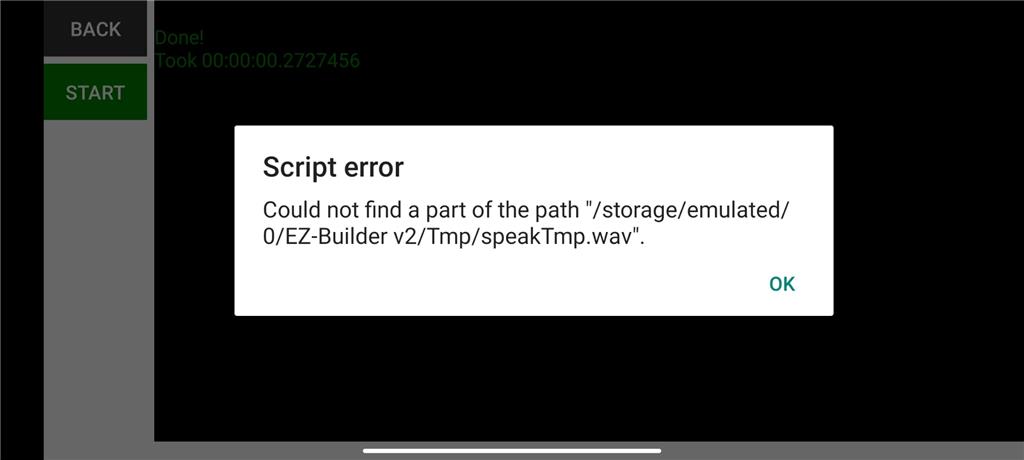
Hi, From the mobile application I try to make my robot speak in Blockly with the SayEZB block but I get the error that you see in the image Does anyone know how to fix it or what is happening, it is with a JD Humanoid robot? Thanks
Related Hardware (view all EZB hardware)

JD Humanoid
by EZ-Robot
JD humanoid robot kit - WiFi-enabled, 16 DOF with metal-gear servos; easy, fun, educational, available from the EZ-Robot online store.
Wi-Fi / USB
Servos
24
Camera
Audio
UART
3
I2C
ADC
8
Digital
24
Related Robot Skill (view all robot skills)

Output Audio From EZ-B
by Synthiam
Example ARC skill demonstrating converting, compressing and streaming MP3/WAV to an EZ-B speaker, with play/stop commands and TTS examples.
Requires ARC
v11

i believe the speech in mobil app doesn come out the robot but out the your tablet.
Make sure the path is correct to your sound file.
Yes the speech should work ,make sure the google voice is updated on your mobile device, My mobile phone has a cool modified British/Cylon type voice that I also use on Google home app for Google mini speaker. Then that same voice is coming out of my robots when using Mobile Synthiam Arc.