

shaimaabes
Egypt
Asked
— Edited
 Resolved by ptp!
How Could I Use Ez Face Detection In My Vs Application
Hello everyone especially @ptp,
I need to know how to use the ez face detection method in my vs app
i try this code but it didn't work
ValuePair vp = (ValuePair)cbVideoDevices.SelectedItem; camera.StartCamera(vp, pictureBox1, 640, 480);
camera.CameraFaceDetection.GetFaceDetection();
all I need is to use ez face detection as emgu face detection doesn't work with ez camera , even i try to implement it on my jd camera it throw an exception that it can't implicit emgu quary frame to ez camera . get current bitmap
also i try this code
            ValuePair videocamera = (ValuePair)cbVideoDevices.SelectedItem;
            camera.StartCamera(videocamera, pictureBox1, 640, 480);

            //==============================================

            //Bitmap bmpImage = this.camera.GetCurrentBitmap;
            //if (this.camera.GetCurrentBitmap == null)
            //{
            //    MessageBox.Show("Error");
            //}

            //wait 10 seconds for the first camera frame
            Image ImageFrame = null;
            EventWaitHandle startEvent;
            startEvent = new EventWaitHandle(false, EventResetMode.AutoReset);


             //   Bitmap bmapImageOutput = this.camera.GetCurrentBitmap;
              //  pictureBox1.Image = bmapImageOutput;
                //ImageFrame = new Image(this.camera.GetCurrentBitmap);


            if (ImageFrame != null)
            {

                Image grayImage = ImageFrame.Convert();
                var faces = grayImage.DetectHaarCascade(facedetection, 1.4, 4,
                            HAAR_DETECTION_TYPE.DO_CANNY_PRUNING,
                          new Size(20, 20))[0];
                foreach (var face in faces)
                {
                    //draw the face detected in the 0th (gray) ch
                    ImageFrame.Draw(face.rect, new Bgr(Color.Blue), 3);
                    Bitmap c = ImageFrame.ToBitmap();
                    Bitmap bmp = new Bitmap(face.rect.Width, face.rect.Height);
                    g = Graphics.FromImage(bmp);
                    g.DrawImage(c, 0, 0, face.rect, GraphicsUnit.Pixel);
                    MessageBox.Show("Showing Image in PicBox2");

                }
                MessageBox.Show("FD Code didn't RUN");
                pictureBox1.Image = ImageFrame.ToBitmap();
                //===========================

please use the code format tags before and after your c# fragment code, it makes a huge difference when reading code.
The EZB SDK method:
is very similar to the :
How to start:
https://synthiam.com/Tutorials/UserTutorials/23/1 but there's more information/help inside ARC (i.e. Blue Question mark in controls)
which uses the CameraCustomColorDetection.GetObjectLocationByColor
I think if you master the above two points (ColorDetection) you can do other camera Detection methods.
@shaimaabes,
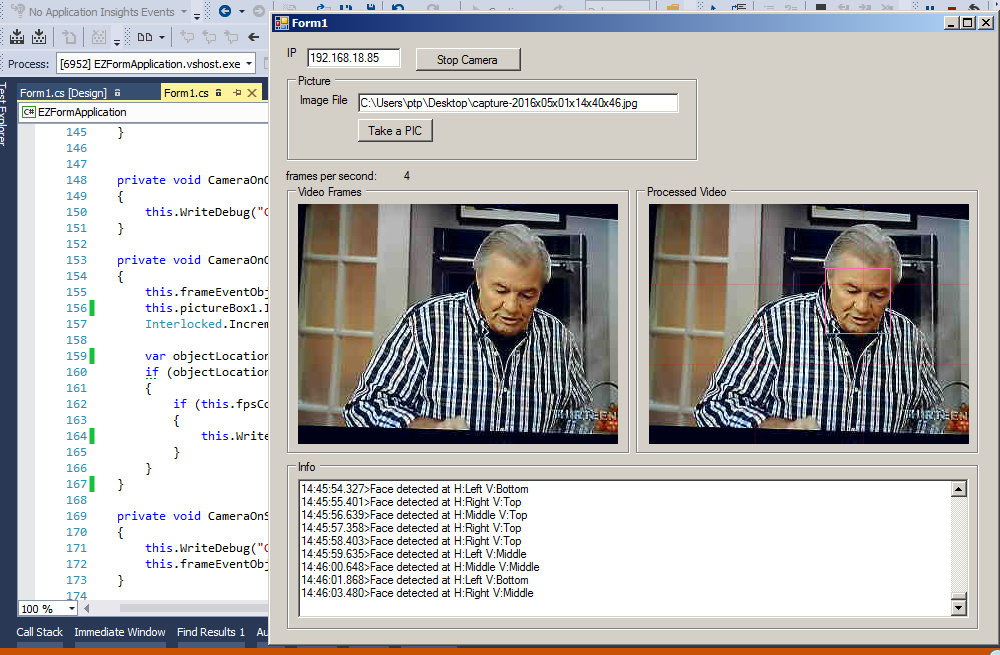
I just open visual studio and is really very simple to detect a Face.
the code runs every 1 st video frame per second.
@ptp Your consistent guidance helps me to increase my potential in work . You show the path of brighter world , which makes me able grasp my aims . Thankful to dear Boss _
@shaimabes,
Thanks for kind words, but do not forget:
you are using a EZ-Robot software, it's very important to get familiar with the "user" tool, before embracing the SDK, some functionalities are easy to see working in the ARC side, there are a lot of tutorials, and posts where you can learn more.
I've updated the source code
https://github.com/ppedro74/ez-robot-form-application
to support EZR Face Detect.
The camera.GetCurrentBitmap() is only available within the CameraOnOnNewFrame() event. Because until CameraOnOnNewFrame() is raised, there are no images to "get".
Also, there's an update to the sdk today - which includes some performance enhancements to the video: https://synthiam.com/Products/ARC
thanks @DJ Sures alot for ur replay
@ptp would u contact me on my email or send me ur email I've made it using haar cascade & i want to share it with u & to get ur feedback of it would u give me that chance please . my email ([email protected])