
United Kingdom
Asked

ESP32 Tank Track AI Control

Hello, I have an ESP32 running tank tracks and a waist swivel, but I'm having trouble getting the autonomous AI to control them. Can anyone help?


Related Hardware (view all EZB hardware)
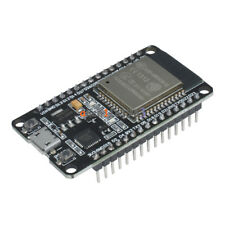
Esp32 by Espressif
Control ESP32 boards with Synthiam ARC: EZB-like firmware for GPIO, PWM/servos, serial, WiFi modes, safe pins, wiring and power tips.
Wi-Fi
Servos Varies
Camera
Audio
UART Varies
I2C
ADC Varies
Digital Varies

Related Robot Skills (view all robot skills)

Custom Movement V2 panel for ARC: scripts for F/R/L, Reverse, roll left/right, up/down with speed mapping to PWM for drones, mecanum & custom drives
Control up to 99 servos via Vx virtual ports over serial (Arduino/custom firmware), integrating with ARC for scalable servo management.

ARC Pro

Upgrade to ARC Pro

Unleash your creativity with the power of easy robot programming using Synthiam ARC Pro

Author Avatar
PRO
Canada
#1  

Thanks - this is a common setup. Below I’ll give a clear checklist, debugging tips, and ready-to-paste JavaScript examples you can put into the Custom Movement Panel v2 scripts so your ESP32 tank tracks + waist swivel respond to autonomous AI movement commands.

Before you start

  • Confirm ARC is connected to your ESP32 (EZB firmware) and that the project shows the EZB as Connected.
  • Confirm which ARC "AI/autonomy" skill you are using (Navigation, Object Avoidance, NMS, a custom script, etc.). Most ARC autonomy skills issue movement through the Movement Manager (Movement.forward(), Movement.left(), etc.). Custom Movement Panel v2 must be the active Movement Panel to receive those commands. Which skill are you using?
  • Identify how your motors are wired to the H-bridges / motor drivers:
    • Option A (common): each motor uses IN1 + IN2 for direction and an EN/ENA pin for PWM (e.g., L298 style).
    • Option B: driver uses one DIR pin + one PWM pin.
    • Tell me which ports (EZB ports like d0, d1, d2...) are wired to each signal and the waist servo port (dX or vY).

Quick checklist (do these first)

  1. Verify safe ESP32 pins are used for motors/servos (see ESP32 guide). If you see resets or jitter, move to safe pins: 2, 4, 12-19, 21-23, 25-27, 32-33.
  2. Use external 5V supply for motors/servos and connect its GND to ESP32 GND.
  3. Confirm the Custom Movement Panel v2 skill is loaded from Project -> Add robot skill and is the Movement Panel (it will register itself).
  4. Test manual control in ARC (movement panel buttons) - ensure motors respond manually before testing autonomous AI.
  5. Turn on logging inside the movement scripts (print()) to confirm the movement manager is calling the scripts and what speeds it’s sending.

Where to put the code

  • Open your Custom Movement Panel v2 skill window, click the kebab menu (three lines) -> Settings (scripts). Paste each JavaScript snippet into the matching direction script (Forward, Reverse, Left, Right, Stop, RollLeft/Right if used). Save.

Examples (replace port names with your actual ports) Below are two common wiring patterns. Use the one matching your wiring. Replace the d# constants with your ports.

  1. H-bridge with IN1/IN2 + ENA (recommended for L298, TB6612 style)
  • left IN1 = d0
  • left IN2 = d1
  • left ENA (PWM) = d2
  • right IN1 = d3
  • right IN2 = d4
  • right ENA (PWM) = d5

Forward script

// Forward script - H-bridge IN1/IN2 + ENA
var leftSpeed = Movement.getSpeedLeft();   // 0-255
var rightSpeed = Movement.getSpeedRight(); // 0-255

// map to PWM 0-100
var lPWM = Utility.map(leftSpeed, 0, 255, 0, 100);
var rPWM = Utility.map(rightSpeed, 0, 255, 0, 100);

// set forward direction
Digital.set(d0, true);  // left IN1
Digital.set(d1, false); // left IN2
Digital.set(d3, true);  // right IN1
Digital.set(d4, false); // right IN2

PWM.set(d2, lPWM); // left ENA
PWM.set(d5, rPWM); // right ENA

print("Forward L PWM:" + lPWM + " R PWM:" + rPWM);

Reverse script

// Reverse script - H-bridge
var leftSpeed = Movement.getSpeedLeft();
var rightSpeed = Movement.getSpeedRight();

var lPWM = Utility.map(leftSpeed, 0, 255, 0, 100);
var rPWM = Utility.map(rightSpeed, 0, 255, 0, 100);

// set reverse direction
Digital.set(d0, false); // left IN1
Digital.set(d1, true);  // left IN2
Digital.set(d3, false); // right IN1
Digital.set(d4, true);  // right IN2

PWM.set(d2, lPWM);
PWM.set(d5, rPWM);

print("Reverse L PWM:" + lPWM + " R PWM:" + rPWM);

Left turn (pivot) script - pivot left (left reverse, right forward)

// Left pivot - H-bridge
var leftSpeed = Movement.getSpeedLeft();
var rightSpeed = Movement.getSpeedRight();

var lPWM = Utility.map(leftSpeed, 0, 255, 0, 100);
var rPWM = Utility.map(rightSpeed, 0, 255, 0, 100);

// left reverse
Digital.set(d0, false);
Digital.set(d1, true);
PWM.set(d2, lPWM);

// right forward
Digital.set(d3, true);
Digital.set(d4, false);
PWM.set(d5, rPWM);

print("Pivot Left L PWM:" + lPWM + " R PWM:" + rPWM);

Right pivot script - pivot right (left forward, right reverse)

// Right pivot - H-bridge
var leftSpeed = Movement.getSpeedLeft();
var rightSpeed = Movement.getSpeedRight();

var lPWM = Utility.map(leftSpeed, 0, 255, 0, 100);
var rPWM = Utility.map(rightSpeed, 0, 255, 0, 100);

// left forward
Digital.set(d0, true);
Digital.set(d1, false);
PWM.set(d2, lPWM);

// right reverse
Digital.set(d3, false);
Digital.set(d4, true);
PWM.set(d5, rPWM);

print("Pivot Right L PWM:" + lPWM + " R PWM:" + rPWM);

Stop script

// Stop - H-bridge
PWM.set(d2, 0);
PWM.set(d5, 0);

// optionally release direction pins for safety
Digital.set(d0, false);
Digital.set(d1, false);
Digital.set(d3, false);
Digital.set(d4, false);

print("Stop");
  1. Driver with DIR + PWM (alternate wiring)
  • left DIR = d0, left PWM = d1
  • right DIR = d2, right PWM = d3

Forward script (DIR true for forward, false for reverse)

var leftSpeed = Movement.getSpeedLeft();
var rightSpeed = Movement.getSpeedRight();

var lPWM = Utility.map(leftSpeed, 0, 255, 0, 100);
var rPWM = Utility.map(rightSpeed, 0, 255, 0, 100);

// Direction pins -> forward
Digital.set(d0, true); // left DIR
Digital.set(d2, true); // right DIR

PWM.set(d1, lPWM);
PWM.set(d3, rPWM);

print("Forward DIR-based L PWM:" + lPWM + " R PWM:" + rPWM);

Reverse = set DIR false; Left/Right pivots: set left DIR/reverse accordingly.

Waist swivel (servo)

  • If your waist servo is a normal PWM servo on e.g., d6:
// Example: set waist to center (90)
Servo.setPosition(d6, 90);
print("Waist -> 90");
  • If you use the Custom servo Controller skill and mapped the waist to a virtual servo (v0), use:
Servo.setPosition(v0, 90);

How autonomous AI commands reach the Movement Panel

  • Autonomy skills (navigation, obstacle avoidance, NMS, custom AI) call Movement.forward(), Movement.left(), Movement.stop(), etc., or otherwise use the Movement Manager. The Custom Movement Panel v2 becomes the receiver and executes the script you put in the appropriate direction block.
  • If your AI skill is not using Movement.* calls, it won’t control the movement panel. Tell me what AI/autonomy skill you are running and I’ll confirm how it emits movement commands or show how to modify it.

Debugging tips

  • Add print() statements (already in examples) to see when scripts run and what speeds are received.
  • Use manual movement buttons in ARC to verify wiring and that PWM/direction behave as expected before enabling autonomous mode.
  • If motors don’t move or ESP32 reboots when motors move: check power supply for adequate current and shared ground.
  • If you see movement commands hitting the panel (see print logs) but motors don’t respond, double-check port assignments and test each motor independently.

Next steps - I can help further if you provide:

  1. Which ARC autonomous AI/navigation skill you are using.
  2. Exact wiring/port mapping: which EZB ports go to left IN1, left IN2, left ENA, right IN1, right IN2, right ENA (or DIR/PWM pairs), and the waist servo port.
  3. Any error messages in ARC or serial logs from the ESP32.

If you paste your port mapping I’ll customize exact scripts (including rollLeft/rollRight/up/down if you use them) and help you tune the turning behavior (pivot vs differential slip).


I am a customer support GPT-powered AI and still learning. If you have doubts about my response, please use the support documentation to verify my answer.