

 Resolved by


Getting this error message while using cognitive emotion ..is this usual?
Checking...
System.InvalidOperationException: An invalid request URI was provided. The request URI must either be an absolute URI or BaseAddress must be set.
at System.Net.Http.HttpClient.PrepareRequestMessage(HttpRequestMessage request)
at System.Net.Http.HttpClient.SendAsync(HttpRequestMessage request, HttpCompletionOption completionOption, CancellationToken cancellationToken)
at Microsoft.ProjectOxford.Common.ServiceClient.d__222.MoveNext() --- End of stack trace from previous location where exception was thrown --- at System.Runtime.CompilerServices.TaskAwaiter.ThrowForNonSuccess(Task task) at System.Runtime.CompilerServices.TaskAwaiter.HandleNonSuccessAndDebuggerNotification(Task task) at Microsoft.ProjectOxford.Common.ServiceClient.d__202.Checking...
System.InvalidOperationException: An invalid request URI was provided. The request URI must either be an absolute URI or BaseAddress must be set.
at System.Net.Http.HttpClient.PrepareRequestMessage(HttpRequestMessage request)
at System.Net.Http.HttpClient.SendAsync(HttpRequestMessage request, HttpCompletionOption completionOption, CancellationToken cancellationToken)
at Microsoft.ProjectOxford.Common.ServiceClient.d__222.MoveNext() --- End of stack trace from previous location where exception was thrown --- at System.Runtime.CompilerServices.TaskAwaiter.ThrowForNonSuccess(Task task) at System.Runtime.CompilerServices.TaskAwaiter.HandleNonSuccessAndDebuggerNotification(Task task) at Microsoft.ProjectOxford.Common.ServiceClient.d__202.

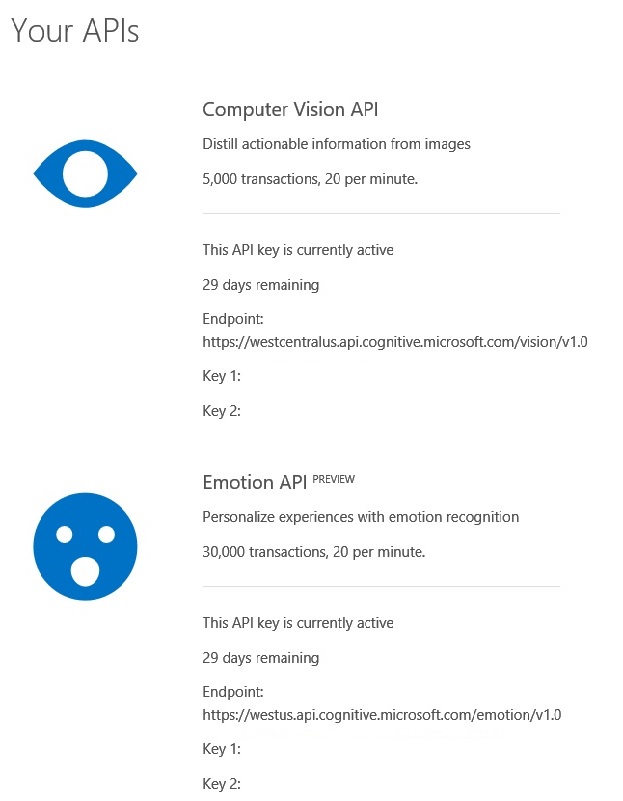
You have an invalid enpoint url ? You should use the endpoint url displayed in your azure account.
Something like this: https://westus.api.cognitive.microsoft.com/emotion/v1.0/recognize
Have used endpoint code too..
Can you post your endpoint?
Have used Key 2 as end point..
Have gone with Endpoint URL but its showing error message like this..
System.Net.Http.HttpRequestException: An error occurred while sending the request. ---> System.Net.WebException: Unable to connect to the remote server ---> System.Net.Sockets.SocketException: A connection attempt failed because the connected party did not properly respond after a period of time, or established connection failed because connected host has failed to respond 40.112.254.71:443 at System.Net.Sockets.Socket.EndConnect(IAsyncResult asyncResult) at System.Net.ServicePoint.ConnectSocketInternal(Boolean connectFailure, Socket s4, Socket s6, Socket& socket, IPAddress& address, ConnectSocketState state, IAsyncResult asyncResult, Exception& exception) --- End of inner exception stack trace --- at System.Net.HttpWebRequest.EndGetRequestStream(IAsyncResult asyncResult, TransportContext& context) at System.Net.Http.HttpClientHandler.GetRequestStreamCallback(IAsyncResult ar) --- End of inner exception stack trace --- at System.Runtime.CompilerServices.TaskAwaiter.ThrowForNonSuccess(Task task) at System.Runtime.CompilerServices.TaskAwaiter.HandleNonSuccessAndDebuggerNotification(Task task) at Microsoft.ProjectOxford.Common.ServiceClient.<SendAsync>d__22
2.MoveNext() --- End of stack trace from previous location where exception was thrown --- at System.Runtime.CompilerServices.TaskAwaiter.ThrowForNonSuccess(Task task) at System.Runtime.CompilerServices.TaskAwaiter.HandleNonSuccessAndDebuggerNotification(Task task) at Microsoft.ProjectOxford.Common.ServiceClient.<PostAsync>d__202.MoveNext() --- End of stack trace from previous location where exception was thrown --- at System.Runtime.CompilerServices.TaskAwaiter.ThrowForNonSuccess(Task task) at System.Runtime.CompilerServices.TaskAwaiter.HandleNonSuccessAndDebuggerNotification(Task task) at Microsoft.ProjectOxford.Emotion.EmotionServiceClient.<RecognizeAsync>d__6.MoveNext() --- End of stack trace from previous location where exception was thrown --- at System.Runtime.CompilerServices.TaskAwaiter.ThrowForNonSuccess(Task task) at System.Runtime.CompilerServices.TaskAwaiter.HandleNonSuccessAndDebuggerNotification(Task task) at Microsoft.ProjectOxford.Emotion.EmotionServiceClient.<RecognizeAsync>d__5.MoveNext() --- End of stack trace from previous location where exception was thrown --- at System.Runtime.CompilerServices.TaskAwaiter.ThrowForNonSuccess(Task task) at System.Runtime.CompilerServices.TaskAwaiter.HandleNonSuccessAndDebuggerNotification(Task task) at System.Runtime.CompilerServices.TaskAwaiter`1.GetResult() at Microsoft_Cognitive_Vision.FormMain.<Camera_OnNewFrame>d__14.MoveNext() in C:\My Documents\SVN\Developer - Windows\ARC skill plugins\Microsoft Cognitive Emotion\Microsoft Cognitive Vision\FormMain.cs:line 166Key2 is not the endpoint.
Look to the picture, you have Endpoint, Key1, Key2:
Questions:
Please post your endpoint url:
Can you reach internet from your desktop/ARC ?
Sorry to insist. I believe you are using the wrong endpoint url, go to your microsoft api account and use the endpoint url listed there.
Attention: