


Asked
ARC AI Assistant Script Limits
I have a question about working with long scripts in the new ARC AI Assistant console. The console appears to have a line/character limit and won't accept complete scripts - it cuts them off. I have a script over 1,400 lines, and only about two-thirds of it pastes into the AI console (that includes the text of my request), so I can't submit the entire script plus my instructions.
This script is part of an ARC project and was written using ARC's built-in scripting (JavaScript or Python) for use in a robot skill or global script. Is there a recommended strategy or workflow to get the entire long script into the AI Assistant console so it can be reviewed, simplified, and rewritten?

Are you really saying 1,400 lines? What the heck hahaha. AI has what's called a context window - and that can support only so many characters. I'll have to check to see what the limit is and get back to you. But holy moly - 1,400 lines is a lot! what's this script do?
Dave, can you let us know what AI interface that you are using?
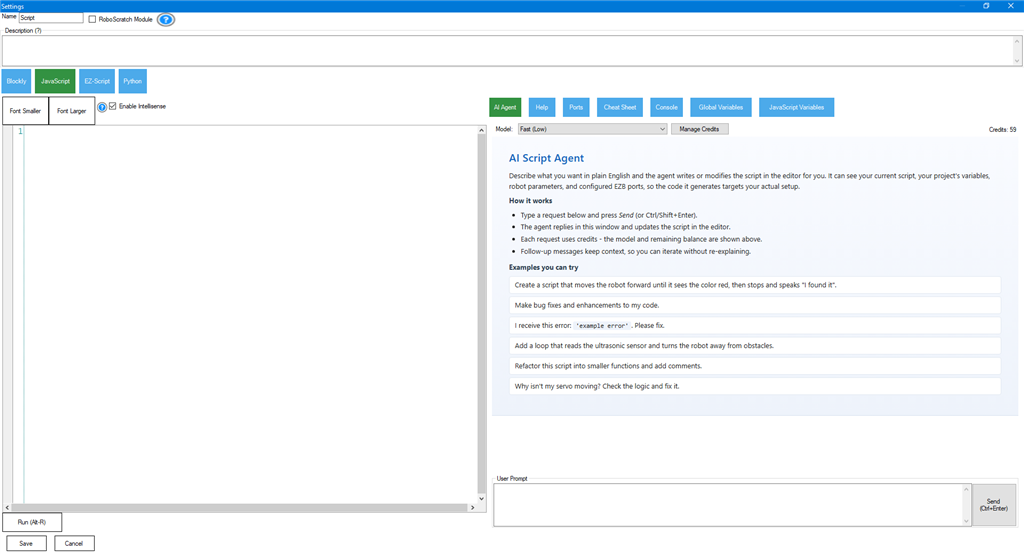
Built into the script editor is an AI Assistant that can access the script and make changes as needed. You do not copy and paste because the AI has access to the script directly. Simply give it your commands and it will make the appropriate changes
AI Chat Assistant is a virtual desktop-style display that you select from the main ribbon menu in ARC. This allows you to chat with the AI for tips/hints, assistant, short scripts, robot skill details, etc...
Which of those are you using for the 1,400 line script?
@Customer Support, Humm, interesting. I didn't know there was an AI assistant in the script editor. I was using the AI Chat Assistant accessed through the top menu ribbon.
Having the AI assistant in the script editor is brilliant. I'll look into that method and give it a try. Thanks!
@DJ, LOL, ya it's one of my longer scripts. It's a long one and I think you helped me rewrite it from EZ Script to Javascript a while back. It works great but it's so long that I thought I'd give AI a shot at simplifying it to run more efficiently and maybe shorten it.
It's a cool script where I ask my Lost In Space B9 Robot to do impersonations of the Lost In Space characters along with other famous movie robots. All in all, at this time, I have about 12 different actors and film robots to randomly pick from. For example he does all the LIS regular actors and robots like R2D2, Hal 9000, Robby the Robot, Bender and lots more. I have 10 to 30 sound clips stored in separate ARC PC sound boards of each person or robot that gets picked randomly.. When I ask the robot to do an impersonation he will randomly pick a character and then randomly pick one of their sound clips from their individual sound boards. Once the first impersonation the script will go back and repeat the the random picking of character and phrase two more times for a total of three impersonations.
Along with this script I also have a separate script that will only give me one random impersonation. I also have built into this script the ability to ask specifically for a single character and it will return a random phrase from them. so I can ask him to do an impersonation of Dr Smith or any other character I have sound clips for and it will just randomly do that one. That works by setting global variables. A different variable for each character. So when I ask for a impersonation of a specific one, that var gets set and the script will go directly to that character's section in the script. .
I hope that all makes sense.. It's all a lot of fun. I have so many characters and sound clips that I never know what will pop up unless I specifically ask for a certain actor or movie robot.
Oh yeah, i do recall that script now! I wonder if the AI will rewrite it in a more concise form for you as well. It's pretty good at that.
The AI Script Agent loads when editing JavaScript or Python in any robot skill editor.
Yep, I found it. I gave the script editor AI a quick try. It worked great for the simple script I showed it as a test. I'm looking forward to feeding of my huge impersonation script.
The only trouble with using this AI is that it's rewriting the scripts in such a advanced format for me that they are kind of hard to understand and follow. It's funny it always says the way to rewrote it makes it easier to read. Lol. Maybe for somebody that has been writing code for a while. For me it's a good learning process. It'll rewrite and I'll go back and study it to see how it works. So in the end that's a good thing.
Thanks for all this hard work.
you can always ask it to add comments. or you can ask it to not make it complicated.
After having the Script based AI look and rewrite a number of my scripts I'm very impressed with what it can do. For example I have a script that asks Open Weather Map for a forecast and the returned file is parsed by this script. The script then picks out the temp, humidity and wind speed for my area and the script has the robot tell me these values using sound files I have stored in ARC's soundboards.
It has worked wonderfully in the past but I wanted it to do more. Before the AI rewrite the script only returned whole numbers and only between the temps of 20 degrees and 99 degrees. Sometimes down here in Florida it gets above 100 and the script wouldn't be able to report that. Also Open Weather Map returns the temp and windspeed with a decimal. I don't really need to hear the fraction of the returned temp or wind speed but it's cool and available, so why not. Also that's the way the actual B9 robot from the Lost In Space TV show spoke, so it's more realistic. Anyway, after asking the script editor AI Assistant to make these changes the new script worked great and as expected. Now instead of him saying something like "The Temperature is at 89 degrees fahrenheit", I'll hear him say "The Temperature is at 89.8 degrees fahrenheit". Same with the windspeed.He also now reports the temp from zero to 199 degrees fahrenheit. I may go back and have him report the temp below zero degrees fahrenheit but it would never get down there here in Florida. Still it would be nice to have that covered.
I did have to run the script past AI a few times before it was working the way I wanted, Then I had to do a minor editing to get it to work as I wanted. However that all was my fault as I gave it incorrect information on one of the sound file I wanted to use. If I had given it the correct sound files I wanted to use I'm sure it would have only taken one try.
I used about 15 credits to have AI rework this script a few times and punch it up. If my math is correct, I figure the credits cost about .2 cents each so the whole thing cost me about $3 USD. In my opinion, not bad and worth every penny for someone like me.
So ya, me being a coding novice and never really have worked with AI much before, there is a little bit of a learning curve to get my wanted results. All in all I'm very impressed with this tool. Having the AI assistant in the Scripting Editor where it can work directly with a script is brilliant. Nice work Synthiam! You've done it again.