
tom.caine
Here's a video which shows how you can use a GoPro for time lapse photography with Roli. - https://www.youtube.com/watch?v=IreUCKTxbbg
Question - which control is being used? I'd like to know where to enter the script to allow Roli to move. I assumed it was either the camera control or the Auto Position Movement Panel. I entered the script in each control but Roli isn't responding.
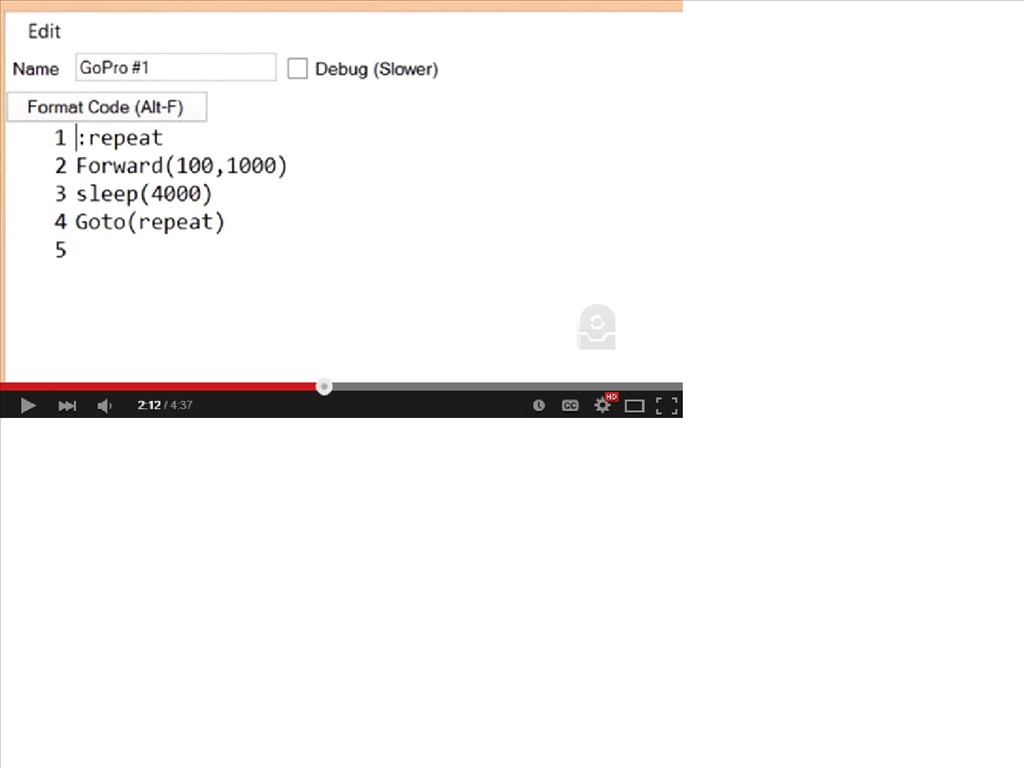
Here is the script from the video:
Any suggestions?

Step 1
Here's a video which shows how you can use a GoPro for time lapse photography with Roli. - https://www.youtube.com/watch?v=IreUCKTxbbg
Question - which control is being used? I'd like to know where to enter the script to allow Roli to move. I assumed it was either the camera control or the Auto Position Movement Panel. I entered the script in each control but Roli isn't responding.
Here is the script from the video:
Any suggestions?
