

EZMQTT Client icon EZMQTT Client MQTT client for ARC: connect to brokers, publish/subscribe topics, map incoming messages to variables (incl. binary arrays) and run scripts. Try it →
Asked — Edited
No Wait For Motion Statement In Blockly

No Wait For Motion Statement In Blockly

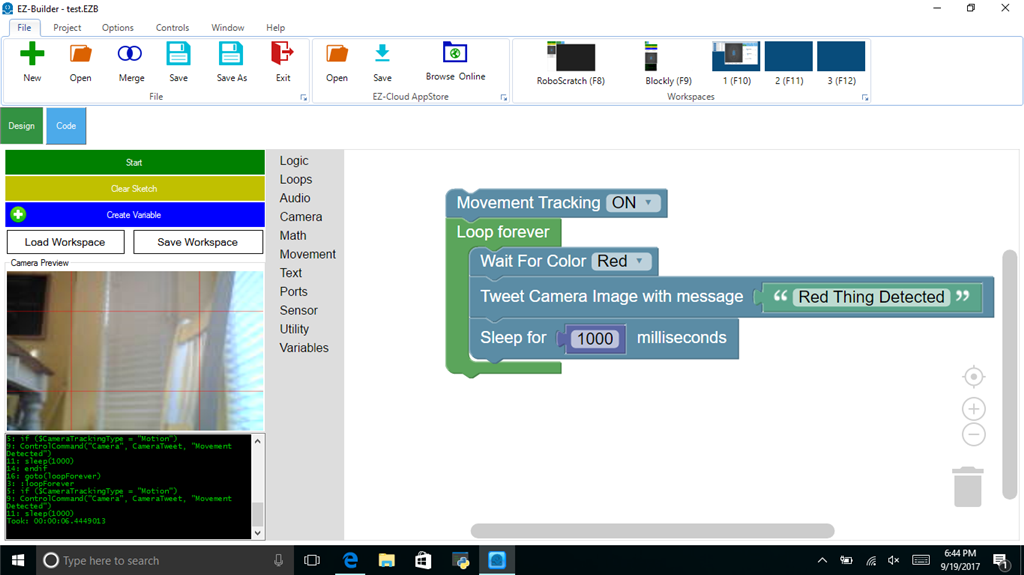
Hi, I want to use Blockly to do simple motion capture and tweet the photo to my twitter account.

There are "Wait for Color", "Wait for Object", Wait for Glyph", etc commands in blockly. There is no "Wait for Movement".

How would I easily put that in blockly?

Attached is a simple "Red Thing Detected" example. I want to do the same thing with Motion Detected.

User-inserted image


ARC Pro

Upgrade to ARC Pro

With ARC Pro, your robot is not just a machine; it's your creative partner in the journey of technological exploration.