






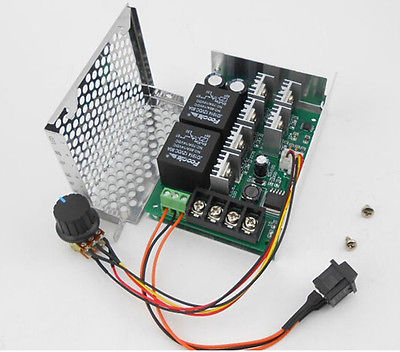
I've been reading up and not quite sure which is correct for me, sabertooth, kangaroo, hbridges, and that easily work with the ez-b. It seems there are a lot of post, but refer to other posts and each has a different way of working but seem to have a few buts. If you have this then use this and now I'm unsure. My original thought was a sabertooth.
I have 2 24v dc motors 8.9amp
My battery is two 18v in parallel getting 8ah
I am looking for speed control, I'm going to use the moble app, but might want to switch to a game remote.
Is the sabertooth the correct and easiest way to connect to the ez-b? I was at the Robotshop looking and there are a lot of choices. https://www.robotshop.com/en/medium-power-motor-controllers.html
Thanks

Why not go for the easiest sollution... Install esc's. They come for brushless or brushed motors, cheap, high performance and compact.
Here's a small overview:
Hobbyking - Esc's
Good luck,
Dave that sounds good. How do I contact you? I don't see a PM option here.
Thanks, DAn
Hi Dan,
My email is dschulpius at gmail dot com
Replace the at with @ and the dots with . LOL
Have used this motor controller in a number of projects . To connect to EZB use two relays to select direction and a servo motor to adjust potentiometer if you need to adjust speed. Ideally suited to test run motor with manual controls ( select motor direction and speed using switch and potentiometer ) without use of EZB
40Amp 12v 24v 48v Variable Speed Drive Motor Controller Reversible Control CCW