
Hi,
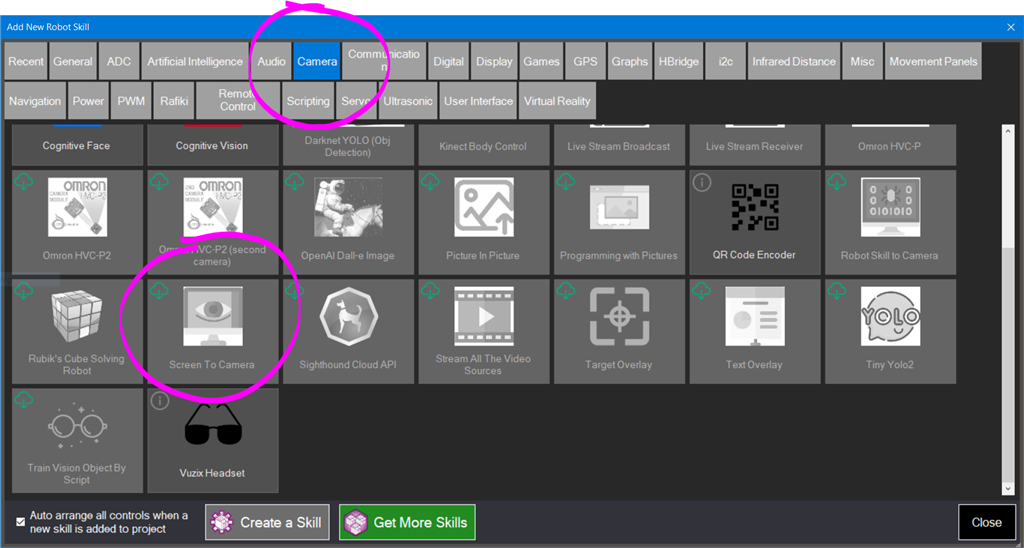
I'm having trouble locating the Screen to Camera skill in ARC. Has it been retired, or is there a specific section in ARC where I can find it?
 Custom Movement Panel V2
— Custom Movement V2 panel for ARC: scripts for F/R/L, Reverse, roll left/right, up/down with speed mapping to PWM for drones, mecanum & custom drives
Try it →
Custom Movement Panel V2
— Custom Movement V2 panel for ARC: scripts for F/R/L, Reverse, roll left/right, up/down with speed mapping to PWM for drones, mecanum & custom drives
Try it →
Hi,
I'm having trouble locating the Screen to Camera skill in ARC. Has it been retired, or is there a specific section in ARC where I can find it?


The category in ARC is in the Camera section. The current version as of your question is v7 published 7/5/2022
As you can see it is not there
or is it the robot skill to camera?
The items are in alphabetical order. I can see the item on the lower left of your screen shot. You can use the scroll bar to scroll down the screen.
got it, thanks