


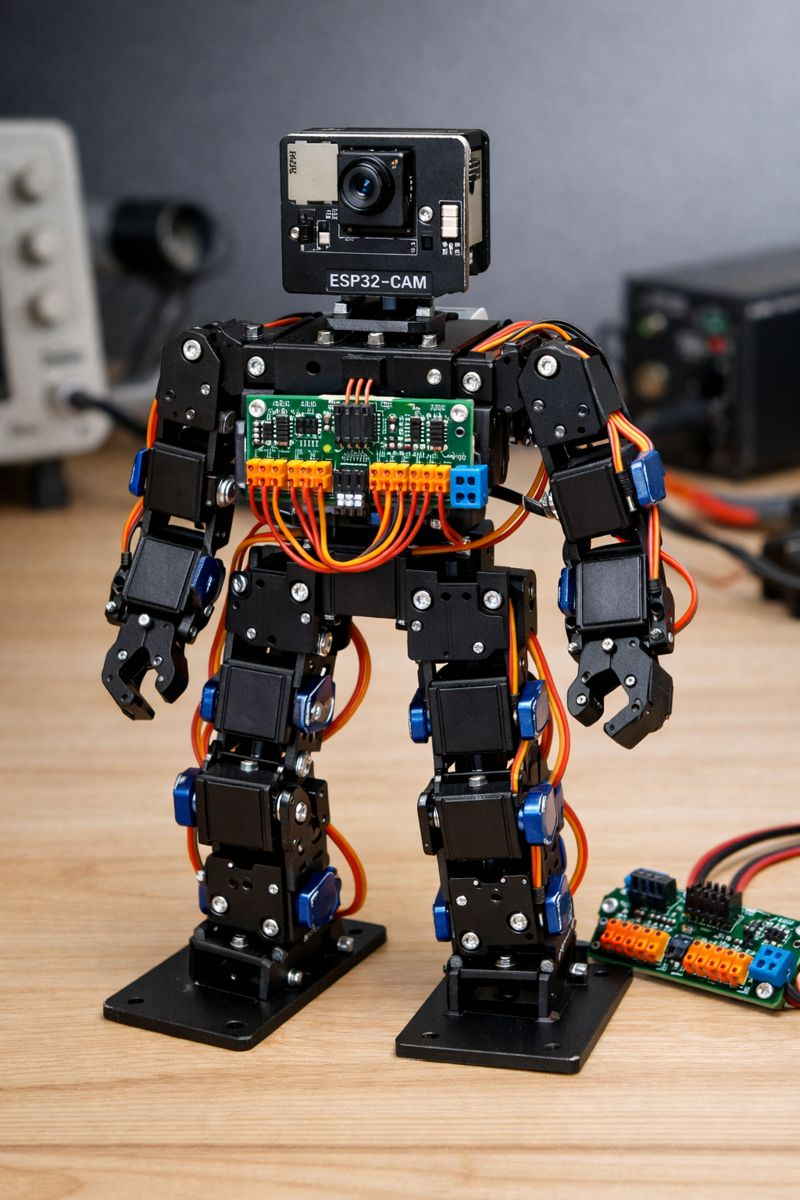
Affordable Modular ARC Robotics Kit
Is it time for a new ARC compatible Robotics Kit? Most of us came across ARC back in the days of EZ-Robot. These are great robotic kits for schools and summer camps to teach kids robotics. The problem is the cost and availability. ARC now works with ESP32-CAM and PCA9685 controllers. Together these provide a lot of the functions of an EZ-B for around $5. So now using low cost servos like MG90S or other 9g servos you can build a bipod robot that works with ARC for under $50. Using a modular design the pieces could also be used to build other robots like Hexapods, Robotic Dogs, Rovers etc. ARC has all the functions built in to support a new robotics kit all we need to do is design the connectable servo casings, servo horns. body and other components for 3D printing. We could then provide the free 3D printable models and even make kits available for sale. ARC makes it easy to program, build and configure the robot and this would make robotics a low cost barrier of entry for students and still teach all the skills needed to learn basic robotics with all the features that now come with AI integration.
There are a bunch of opensource ESP / PCA based robots available that you can make work with ARC today, but I think a modular design that allows you to build a range of different robots that have pre programmed projects, scripts and build instructions available for ARC would be the best approach.
Anyone interested in working on something like this ?

Arc supports 24 per ezb. This is due to the bandwidth available per connection. We had evaluated it before and realized adding more crates latencies and fills the tcp packet buffer with small payloads. So we could make it so 24 and just use 8 of a second pca
The cheap little AI Thinker Works well. Use GPIO 13 and 15 (Change Pins in Arduino File). Its a little tricky to find out IP though because you can't connect to USB without adapter board and Serial monitor stops at can't find PCA9685 but doesn't show IP so you have to flash the board with regular ESP-CAM firmware first to grab the IP address. May want to swap order so it connects to wifi first then connects to PCA so you can get the IP.
Sorry little buddy you gonna have to take one for the team. Looks like I need to remap D16 D17 and D18 for his right leg. Wonders how to get his eyes to work now
Are you running in client mode, is that why you don't know the IP?
The PCA9685 must be initialized before the IP is displayed or the WiFi is connected. Otherwise, connecting to it is useless without an IP, because it can't move servos anyway. Why are you getting an init error? Is there no PCA connected?
Oh the ai thinker module doesn’t have a usb connector to program it so I plugged it into the programmer board but that covers the pins you need to connect to PCA module. I guess I could have used a normal FTDI usb to ttl serial board but this thing has buttons to put it into program mode and reset and its no fuss just plug it in. When you unplug it from the programmer board you can’t use serial monitor (again unless you connect an FTDI board) so you can’t see IP address after it initializes PCA.
Okay so you're using client mode? Connecting it to your network? I wonder if i can put a broadcast in it.... let me think about how to squeeze that in
Becuase in AP mode, it would always be what you set it to. Which by default is 192.168.1.1
I had to add a LM2596S Step-Down (Buck) converter to power 5V for ESP and PCA (~ $1) and I think I need to put a heat sink on the ESP (~$1) as it gets a little toasty but looks like we have a workable solution.
I didn’t connect the ez-robots eyes although they would probably work if I piggy back off the SDA SCL lines but I think neo pixels off one of the GPIO pins would be a much cheaper solution.
I also don’t have a solution for audio as we don’t have a lot in the way of GPIO pins left. Open to suggestions as the best I can come up with is a 2n2222 transistor off the remaining pin. I am not using the TX/RX pins after I flash so maybe I can repurpose these and steal GPIO 1 and 3 for Audio and connect a MAX98357A and provide high quality audio.
hi nink
cool pictures . here's an idea maybe you can use .
https://www.robotshop.com/products/xiaor-geek-humanoid-robot-smart-boxing-football-dancing-robot-graphical-programmable-with-phone-and-windows-pc-app-diy-armored-rc-robot-with-servo-lights-1?qd=da0c870be4ab01c702c692ce72f97948